
Living on campus
We are committed to ensuring that our community is a safe, active and enjoyable place to live throughout your studies.
Welcome To Residence!
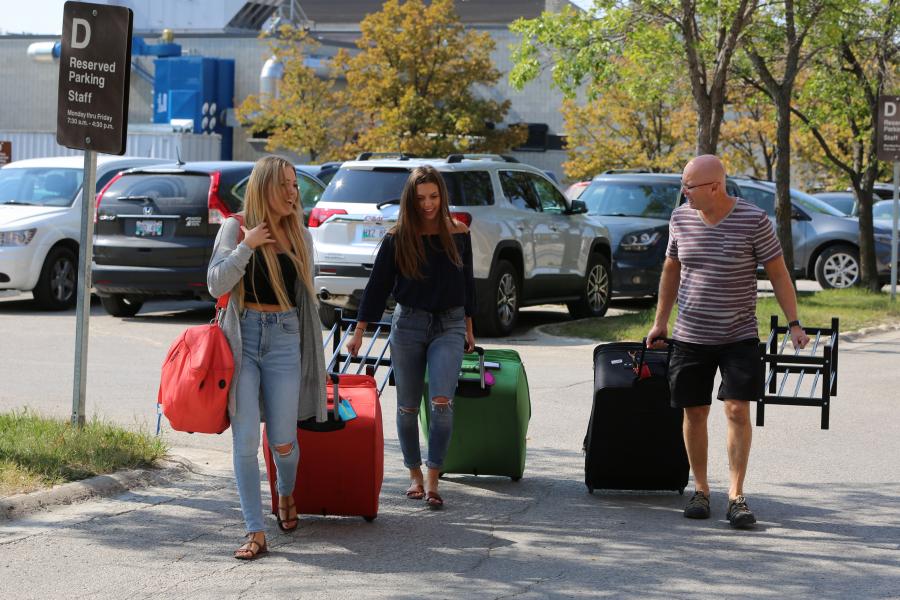

Fall 2024: Move-In Weekend
August 31, 2024 - September 1, 2024
Check-In Dates:
New Residents: August 31, 2024
Returning Residents:September 1, 2024
Check-In Hours:
9:00am-9:00pm
If you arrive after 9:00pm, please make alternate arrangements to check-in on the following day.
Early Arrivals: After you've received a room offer, you may apply for an early move-in date between August 24-August 30. Subject to availability and some additional charges. Arrivals before these dates are encouraged to reserve a hotel room.
Please contact our residence staff by emailing residence@umanitoba.ca or by calling us at (204) 474-9922.
Use these guidelines to ensure your stay in residence begins as smoothly as possible:


Summer Term & Conference
Staying for Summer
Please be advised that residence buildings and floors are designated for summer conferences and group bookings from May to August.
Current Residents: If you've applied for summer term accommodation and a room change is necessary, you will be notified in advance.
What to bring?
Packing for residence life
Here are some suggestions of items you may wish to consider bringing with you:
- Consider greening your shopping list by purchasing eco-conscious products.
- Reduce waste by using reusable or second hand items whenever possible.
- If you are required to self-isolate, please ensure you have the proper equipment such as a laptop, tablet or smartphone with a universal travel adapter.
- Linen and pillows are not provided; you can pre-order through Campus Linen.
What to bring
For your room
- Linen (bedding)*
- Pillows
- Towels
- Seasonal Clothes
- Hangers
- Laundry Supplies
- Toilet paper (Arthur V. Mauro / Pembina Hall Residence)
- Cleaning Supplies (AVM/PHR)
- Garbage Bags
- Bar Fridge (5 cubic ft. or smaller)
- Fan
- Sticky Tac
* Linens may be purchased from Campus Linens Canada: campuslinenscanada.com
Technology
- Ethernet/network cable (for wired internet connection)
- Power bar
Cookware
- Automatic shut-off kettle
- Automatic shut-off coffee pots
- Electric wok / frying pan
- Kitchen supplies
- Rice cooker
- Slow cooker
- Toaster
All hot plates and cooking devices that are open-coiled, open flame, gas-based or are for the purpose of deep frying, are strictly prohibited in all residence buildings.
Additional information
- Microwaves are provided on every floor
- Please remember your insurance information including ID’s, medical information and important documents.
What not to bring
For your room
- Candles/wax warmers
- Drones
- Extension cords
- Full size fridge
- LED strip lighting
- Mattresses
- Pets
- Sub woofers
Technology
- Wireless router (unless you turn the Wi-Fi off)
- Wireless printer (unless you turn the Wi-Fi off)
Cookware
- Deep fryers
- Hot plates
- Induction hot plates
Top 10 things to know while living in residences
1. Quiet hours
Residents have the right to sleep and study in our residence halls, and to that end the community has set these quiet hours:
- Sunday to Thursday, 11 p.m. to 8 a.m.
- Friday and Saturday, 2 a.m. to 8 a.m.
2. Smoking and fire safety
Smoking is strictly prohibited in residence halls AND within 8 meters (25 feet) of any building entrance or exit. Use of candles or incense in residences is not permitted either in common spaces or private rooms. All occupants of the building must evacuate when a fire alarm sounds and cannot return until the alarm is off.
3. Hot plates
Hot plates, including induction hot plates are not permitted anywhere in residence, including Arthur Mauro sites. Hot plates found in use or possession will be confiscated and returned to the user upon move-out.
4. Keys
Residents are not permitted to lend their residence keys or fobs to anyone else.
5. Drinking games
Participating in “drinking games,” any activity involving skills, chance or endurance on the part of one or more persons who play according to a set of rules that consist solely or partially on the consumption of alcohol is not permitted.
6. Bullying and harassment
Harassment and bullying is not permitted on our campus. Harassment is defined as inappropriate comments or conduct in relation to a person or group of persons that has the effect or purpose of creating a hostile or intimidating living environment.
7. Guests
Residents are responsible for the actions of their guests and will be held accountable for any violations of community standards. Any resident who facilitates access to a stranger or otherwise “un-hosted” person will be considered that person's host and will be held accountable their behaviour.
8. Roommates
Roommates each have a right to share in the determination of the use of the room. In particular, residents should consult one another before inviting a guest or guests to visit in the room and should obtain permission before allowing a guest to remain for the night.
9. Illegal drugs are prohibited
Use or possession of illegal, prescription, and/or non-prescription drugs for recreational purposes is prohibited on University property and is a violation of the Residence Contract. Evidence of drug traces or drug paraphernalia will be assumed to be conclusive of use or possession.
Smoking, growing, or preparing/cooking cannabis is not permitted inside of residence buildings or rooms.
10. Vandalism and damage
Residents will be expected to assume all or a portion of the cost of damages caused by themselves or their guests.
Payment information
UM students
All residence charges, which include room, meal plans, fees and miscellaneous charge items will appear on a student’s Aurora account. The payment deadline for each term will be noted on a student’s Aurora account and must be paid in accordance with Financial Services’ payment options.
Credit card payment - available online through your Aurora account
Although you can pay your university fees by credit card, we recommend you first consider other methods of payment to avoid paying additional charges or convenience fees.
- A non-refundable convenience fee of 2.5 per cent is added to your total payable.
- You can only make credit card payments from your Aurora account.
- VISA and MasterCard are the only accepted credit cards.
- Maximum payment is the amount owing on your account.
Online or mobile banking: the preferred method
Make payments 24 hours a day, seven days a week, from anywhere in the world.
How to sign up:
- Contact your financial institution to set up an online banking account if you do not have one.
- Set up the "University of Manitoba" as a payee. You will need to provide an account number, which is your seven-digit UM student identification number.
- If your financial institution requires more than seven digits as an account number, enter zeros as your lead digits (e.g., if nine digits required by your financial institution, enter 001234567).
International College of Manitoba (ICM residents)
ICM students must pay all fees to Student Residences directly. We accept payment by:
- Cheque
- Canadian Interac cards
- Credit card (VISA or MasterCard ONLY)
Understanding the Residence Fees
Residence charges include room accommodation, meal plans (except for residents in Arthur V. Mauro Residence that opts for accommodation only), tenant insurance, council fees, and residence life programming fees.
All residents are also required to pay a holiday break fee in their Fall term payment which permits them to stay over the break. Residents may opt-out and receive a credit on their Winter term fees.
For more information, please reference 1.4 Residence Service Interruptions in the Residence Contract.
In November, you will receive an email with instructions on how you can opt out of the holiday break fees. Credit adjustments for the opting out are processed in January.
Please be advised that excluding any fees from your total payments due could result in your account being placed on hold and a $50 late fee added to any account balances over $500.
Miss a payment deadline?
- If you miss a payment deadline, you will be charged a $50 late fee.
- Students are responsible for checking their Aurora Student account, email and mailboxes on a regular basis for residence fee balances.
- Unpaid accounts will result in your UM account being placed on hold, which prevents you from using most campus services, including libraries, and can result in eviction.
- Due to privacy laws, the Residence Office cannot discuss a student's account with anyone other than the student. If a student wants the Student Residences Office to release information to a specified person, they must provide written permission to the Student Residences Office.
Standard rent forms for income tax purposes
These amounts are for standard stays in Residence. Please consider your personal circumstances if using these statements to complete your Income Tax return. These statements should not be considered to be tax advice.
2023 Standard rent forms
2022 Standard rent forms
2021 Standard rent forms
2020 Standard rent forms
2019 Standard rent forms
2018 Standard rent forms
2017 Standard rent forms
Mail and courier deliveries
Mail and courier deliveries
Mailboxes are provided for the residents in the residence lobbies. It is your responsibility to check your residence mailbox regularly.
If you receive a package too large for your mailbox, you will receive an email to let you know when it's available for pickup at the Arthur V Mauro front desk.
-
(Student's Name)
Arthur V. Mauro Residence
Box ______ (same as Room #)
120 Dafoe Road
Winnipeg, MB R3T 6B3
Canada -
(Student's Name)
Mary Speechly Hall
Box ______ (same as Room #)
34 MacLean Cres.
Winnipeg, MB R3T 2N1
Canada -
(Student's Name)
Pembina Hall Residence
Box ______ (same as Room #)
30 MacLean Cres.
Winnipeg, MB R3T 2N1
Canada -
(Student's Name)
University College Residence
Box ______ (same as Room #)
220 Dysart Road
Winnipeg, MB R3T 2M8
Canada
Meal Plans
Meal plans
The meal plans include dining exclusively at the Fresh Food Company (Residence Dining Hall). Additional food service retail locations may open during the academic year, but purchases at these locations are not included as part of the meal plan.
Fresh Food Company regular hours
Monday to Friday 7 a.m. to 8 p.m.
Saturday to Sunday 11 a.m. to 8 p.m.
Fresh Food Company
UM Dining Services
Internet Help Desk
Residence Internet Help Desk
When contacting the help desk, please include your building, room number and contact information.
Alternatively, you can log in to Starrez and select "Residence Technology" to create a ticket.
204-226-8951
6:30 p.m. to 9 p.m. (during the academic year)
Parking, Maintenance, and Security
Parking
Please note the following parking arrangements for students moving into Student Residences (Arthur Mauro, Pembina Hall):
Arthur V. Mauro (AVM) and Pembina Hall
- AVM South Loading zone (located being AVM on the North side of the service road)
- The East side of Maclean Crescent (between the Mary Speechly Residence entrance and the corner of Maclean and Freedman Crescent) will be utilized as a temporary loading area.
Weekends or evenings
- License number should be reported to Security, and vehicles will be allowed to park in the 24 hour reserved area.
- Once the vehicle is unloaded it must park in the proper parking areas.
Weekdays between 7:30 a.m. - 4:30 p.m.
- After loading the vehicle must move from the residence area and pay for parking if they do not have a residence permit.
Maintenance requests
For all general repairs or maintenance, please submit a request in your student portal. Please do not submit your request to the work-order desk at Physical Plant, as this will only cause a delay with your issue being fixed.
If your request requires immediate attention, please contact your RA.
Moving out
Please keep these guidelines in mind as you prepare to leave residence.
When do I need to leave?
Move out dates will be established with the release of the Winter 2024 final exam schedule.
As per residence contract, you will need to move out and return your keys to the residence office within 24 hours after your last final exam. A move-out declaration form will become available on the residence portal towards the end of the term.
Only students with valid and verified exams, or academic commitments beyond the last day of the scheduled exam may request a later move-out date. Requests are subject to availability.
When you move out, you must remove all personal items (including garbage and packing materials) from your room, leaving it in the same condition as when you arrived. Otherwise, you will be charged for all costs associated with cleaning the room and collecting personal items left behind. All items left behind will be discarded or donated to charity.
Follow these packing lists to ensure you have not missed anything:
- Arthur Mauro, Mary Speechly and Pembina Hall move-out checklist (PDF)
- University College move-out checklist (PDF)
Move-out recycling
During move-out, if you have household items that you are not taking with you, you can drop them off to be reused or recycled. Items will be delivered to on-campus locations such as the UM Waste Prevention Re-shop, the UMSU Foodbank, and the UMSU Freestore.
Please do not leave working or recyclable household items in your room or the residence garbage rooms. Instead, drop them at these locations:
- Arthur V. Mauro: In the basement
- Mary Speechly Hall: Main floor by mailboxes
- Pembina Hall: Outside laundry room on second floor
- University College Residence: Lobby
Accepted items include:
- Clothing, footwear, accessories, sporting equipment
- Bed linens, comforters, blankets
- Board games, books, magazines
- Dishes, dish soap, dish rack
- Laundry baskets, detergents, hangers, drying racks
- Home décor (lamps, pictures, etc.)
- Working or broken electric devices and appliances
- Working or broken computers and accessories
- DVDs, CDs, videos, records
- Non-perishable food items
Summer storage
If you are staying in residence for the summer, or planning to return in the fall, you can take advantage of our summer storage spaces. Pick up a storage tag from the Arthur Mauro residence office or the University College office. Be sure to fill out the tag with your name and room number, and tear off the bottom portion to claim your storage upon return.
- Arthur V. Mauro Residence storage can be taken to the basement level around the corner from the elevator and up the corridor to the right just past the washroom area. Follow the corridor until you come to where the storage area is and staff will be there to receive you.
- Mary Speechly Hall storage can be taken to the basement level to Room B1, which is just left off the elevator.
- University College Residence storage can be taken to Room 102 in the basement of the college.